Package jmri.jmrit.display
@DefaultAnnotation({})
package jmri.jmrit.display
Provides control panel and associated visible icon classes.
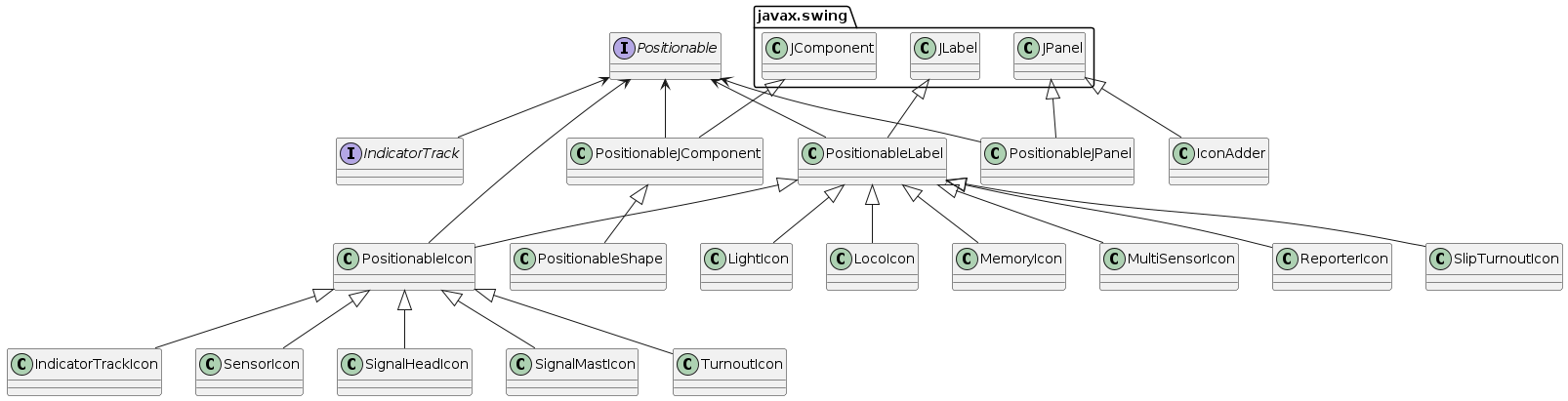
Related Documentation
Several web pages discuss these classes:
- See Also:
-
ClassDescriptionAn Analog Clock for displaying in a panel.An icon that plays an audio on a web panel.An icon to display the value contained within a Block.Displays and allows user to modify x & y coordinates of positionable labels This class has been generalized to provide popup edit dialogs for positionable item properties when TextFields are needed to input data.Extended JmriJFrame that allows to add an InitEventListener for display of a tabbed frame in the CPE Add Item
ItemPalettepane.This is the Model and a Controller for panel editor Views.Factory for creatingAbstractActions that create newEditors.Manager for JMRI Editors.Permissions for panels.An icon to display and input a GlobalVariable value in a TextField.An icon to display a status of a GlobalVariable.An icon to display and input a GlobalVariable value in a TextField.An icon to display a status of a GlobalVariable in a JSpinner.Provides a simple editor for selecting N NamedIcons.Defines track objects that display status color.An icon to display the status of a track segment in a block.A utility class replacing common methods formerly implementing the IndicatorTrack interface.An icon to display a status and state of a color coded turnout.A JmriJFrame with permissions.An icon to display a status of a light.LinkingLabel is a PositionableLabel that opens a link to another window or URL when clickedAdds capability for a object to load a browser page or bring a panel frame to the top.An icon that displays the position of a loco on a panel.An icon that executes a LogixNG when clicked on.An icon to display and input a Memory value in a TextField.An icon to display a status of a Memory.Displays and allows user to modify x & y coordinates of positionable labels This class has been generalized to provide popup edit dialogs for positionable item properties when TextFields are needed to input data.An icon to display and input a Memory value in a TextField.An icon to display and input a Memory value in a TextField.An icon to display a status of a Memory.An icon to display a status of a Memory in a JSpinner.Provides a simple editor for selecting N NamedIcons, perhaps for use in creating a panel icon.An icon to display a status of set of Sensors.Provides a simple editor for creating a MultiSensorIcon object.Start a Panel Editor or a Layout Editor for a new Panel.Display a combo list of panels.Create the "Panels" menu for use in a menubar.Defines display objects.Gather common methods for Turnouts, Sensors, SignalHeads, Masts, etc.PositionableLabel is a JLabel that can be dragged around the inside of the enclosing Container using a right-drag.This class handles text attributes for Positionables.Creates the UI to set the properties of a range of Positionable Icons on (Control) Panels.Companion class to DisplayFrame.An icon to display info from a Reporter, e.g. transponder or RFID reader.An icon to display the position of an RPS input.An icon to display a status of a Sensor.Displays and allows user to modify the text display used in a sensor.An icon to display a status of a SignalHead.An icon to display a status of aSignalMast.Provides a simple editor for creating a Single or Double Slip Icon object.An icon to display a status of a Slip, either Single or Double.Displays and allows user to modify the text display used in a turnout slip This is a modification of CoordinateEdit.java by Dan Boudreau for use with LayoutEditorImplements Tooltips for Positionable objects.An icon to display a status of a turnout.