The Signal Mast Table
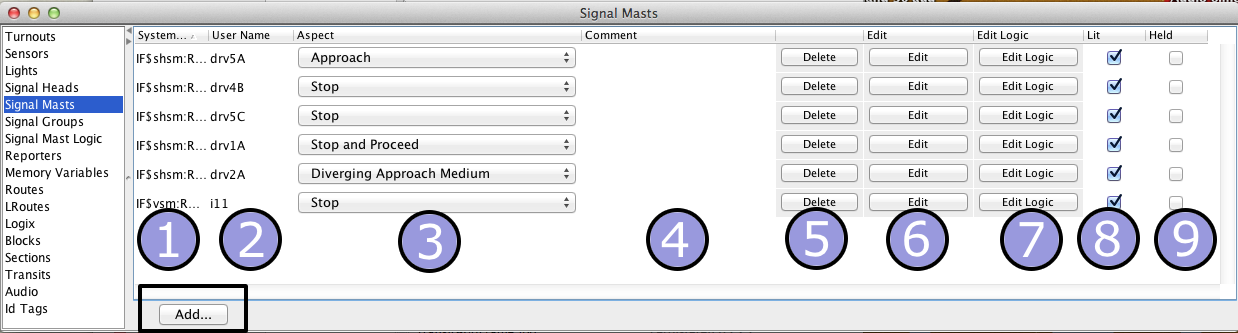
JMRI Signals Masts are managed in the Signal Mast Table. You access this tool from the
Tools > Tables > Signal Masts menu.
You may change the order of the columns by dragging their titles, and sort the rows by
clicking one of the sort triangles next to a column title.
There are nine columns in the Signal Head Table:
- System Name, most often set automatically based on the Signal Mast connection type and
other settings
- User Name, double click to enter your own description or number for this Signal
Mast
- Aspect, this column shows the current Aspect of a Signal Mast. You can change it
manually by selecting a value from the pop up list
- Comment, double click this field to enter text about the location of the Signal Mast or
other notes
- Delete, click on this button to delete a Signal Mast. Use with care!
-
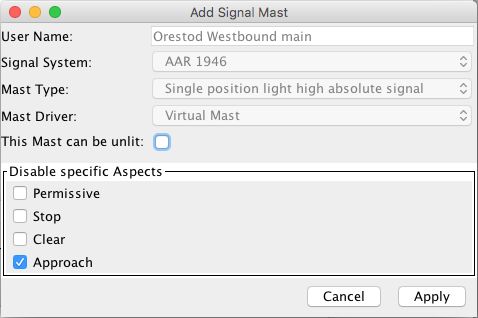
Edit, clicking on one of these buttons opens a
panel where you can disable some of the available Aspects and the Lit status for this
Signal Mast. Note: The System Name, Signal Mast type and driver cannot be changed once a
Signal Mast has been created.
- Edit Logic, this button opens the Signaling Pairs panel showing the lines for this
Signal Mast, from which you can access the Signal Mast Logic
- Lit, shows whether this Signal Mast is Lit, which can be changed by clicking on the
checkbox, via Signal Mast Logic or by Logix
- Held, if this property is checked the Signal Mast will not follow the Signal Mast Logic
e.g. to hold a train at this location waiting for orders.
To define a new Signal Mast, click on the "Add.."
button below the Signal Mast Table. The window that opens next will prompt you for whatever
setup information is needed.
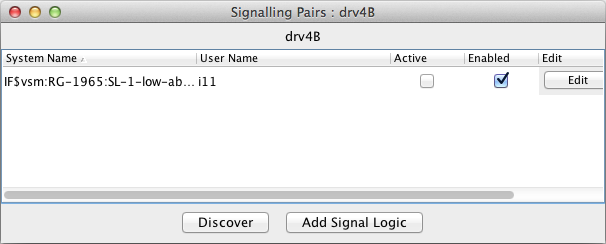
After you clicked on one of the "Edit Logic" buttons in the Signal Mast Table, the
Signaling Pairs window appears. Choose one of the displayed lines and click the "Edit" button
to open the Edit window.
Use the Store item in the File menu to save signal information to disk.
See Loading and Storing Your
Work.
For more information on creating and displaying panels, including how to show signals on
your panels, please see the Panels
pages.
For more information on Aspect Signaling, see the Aspect Signaling
introduction.
Back to the Signal Mast help
intro.
