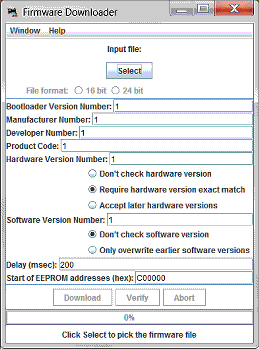
Some LocoNet devices allow users to update the firmware (internal program) via the LocoNet connection. The LocoNet Download Firmware tool provides a mechanism to perform updates via a LocoNet connection.
This tool is not used for loading sound projects into Digitrax sound decoders. The Sound Download Tool may be used for that purpose.
This tool supports firmware update files distributed as either the ".dmf" (Digitrax Mangled Firmware) file format or a ".hex" file format (sometimes referred to as the Intel "I8HEX" file format).
This version of the tool automatically determines how to interpret the firmware update and performs a number of file and data integrity checks before the update information can be used. If any issues are identified in the firmware file, the user is informed and the tool will not allow the user to update the device with what could be erroneous firmware information. This significantly reduces the risk of corrupting the device firmware as compared to previous versions of this tool.
This tool is capable of modifying the firmware in LocoNet devices in ways that could make the devices inoperable. The developers of this tool have attempted to reduce the chances that the tool would corrupt a LocoNet device's firmware. We have successfully tried this tool with a variety of LocoNet devices, computers, operating systems, LocoNet interfaces, and firmware update files.
We cannot guarantee that there is no risk of corrupting device firmware when using this tool. It is impossible for the tool developers to predict every way of using the tool and it is impossible to predict the nuances of various devices, firmware files, computer operating systems, computer-to-LocoNet interface hardware, etc.
In cases where a firmware update attempt does not apply properly, it is often possible to re-apply the firmware update to the device to restore proper device functionality. This has been recommended by at least one LocoNet device manufacturer and has been found to be effective in some cases by the developers of this tool.
Use this tool at your own risk.
If the file is read and parsed successfully, the tool window will enable the "Download" and "Verify" buttons, and update the status message at the bottom of the window to state "Click Download to download new firmware".
If the file cannot be read and parsed successfully, a pop-up message will appear or the tool window will update the status message at the bottom of the window with a description of the problem it found. For more information, see Error Messages, below.
The device may provide an indication that the update process has completed (or failed) using lights on the product or on the display of the product. Consult the device manufacturer's instructions for further information.
Sometimes the device firmware update process does not appear to work, and the device may fail to provide its normal functionality. Often, repeating the firmware update process one or more times will solve the problem. This has been recommended by at least one LocoNet device manufacturer and has been found to be effective in many cases by the developers of this tool.
As an example, if the firmware in a Digitrax DT402D throttle has been updated and that update was not successful, when the DT402D throttle is powered up, the display will usually show a series of dim, filled-in rectangles rather than the normal power-up display of model and firmware revision information. In this case, re-updating the device, using the process shown above, will usually restore the throttle to proper functionality.
In other cases, a device may not be easily restored to proper operation after a firmware update attempt. In this case, consult the device manufacturer for further instructions.
Consult your device documentation and, if necessary, the device manufacturer's technical support if your device fails to function properly after updating its firmware.
Some devices support a firmware "verify" process. This tool can perform the process to send the appropriate LocoNet messages by using the "Verify" button in the tool window. This tool cannot provide any indication of whether the device firmware does or does not match the firmware update file's information because there is no well-defined LocoNet message that conveys this type of information to the tool. Instead, the device may provide the pass or fail results of the verify process, perhaps by a specific blink sequence on an LED or by displaying a message on a display on the device. If a LocoNet device supports the verify operation, the manufacturer' s instructions should describe how the product provides status information for the results of the verify process.
This tool can identify problems at two different stages of the firmware update process. The tool checks for problems within the firmware update file when reading the file. When the user activates the "Download" or "Verify" button, the tool checks the validity of the parameters which the user can change in the tool window for obvious problems. If any issues are found at either of these stages, the tool will update the message at the bottom of the tool window. If a parameter is found to be out of range, that parameter value will be shown with red text instead of black text. The "Download" and "Verify" buttons will not perform any useful function if any of the parameters are invalid.
Typically, when this type of pop-up window appears, a message in the JMRI "console" log will provide additional technical detail about the problem. The firmware update file provider may find this information useful in correcting firmware update file issues.
The tool may also create a pop-up window under certain circumstances.
The tool will open a pop-up window with this message if the user uses the "Cancel" button on the file selection pop-up window. The tool cannot perform a firmware update if no firmware file is selected.
The tool will open a pop-up window if the file selected by the user does not exist. The pop-up window will state that the file was not found. Use the "Select" button to re-specify the correct firmware file.
The tool will open a pop-up window if the file selected by the user contains a value for the "Options" key which is not supported by this tool. Consult the device manufacturer for advice if this occurs.
This status message is shown when an abnormal event occurs which prevents the tool from reading the file from the disk. This is typically a problem with the computer or the media from which the file is being read.
This message indicates that one or more of the values are out of range. Usually it is unnecessary for the user to change any of the parameter values because either the tool's default values are appropriate or because the firmware file specifies the required values. If an invalid value is found in one of the parameter entry fields, the invalid parameter will be highlighted in red. To resolve the problem, close the Firmware Download tool, then re-open it and re-read the file. Be careful not to change any of the parameter field values. If the tool still identifies a value as invalid, consult the device manufacturer.
This status message indicates that the firmware file did not contain any valid firmware information. Consult the device manufacturer for a valid firmware file.
When the tool reads a firmware file which it does not understand, it will show the message "Firmware content in the file is not understood by this reader." in the status line at the bottom of the tool window. Consult the device manufacturer for support - usually this means that the manufacturer must provide a new firmware file.
When the tool reads a firmware file and can determine that the file requires a process which the tool cannot support, the tool will pop-up a dialog box saying "Invalid Prog Blk Size parameter ...". The tool will prevent itself from attempting to update the device. This applies to firmware updates for some newer Digitrax hardware which requires a different firmware update process. For these devices, the Digitrax DigiIPLII software should be used.
The table below shows some capabilities and limitations of this tool.
| "Download Firmware" Tool Capabilities | "Download Firmware" Tool Limitations |
| This tool can read a firmware update file from the computer's local storage. | This tool does not acquire firmware update files from manufacturers. |
| With some older versions of this tool it was very easy to read the firmware update file in a way that caused improper interpretation of the information and which could result in corruption of the device's firmware. This version performs several checks of the firmware update file to ensure that the file is interpreted correctly and to identify partial or damaged firmware update files. If any issues are found in the firmware update file, the tool will not allow the user to perform the update process. This should significantly reduce the risk of corrupting a LocoNet device's firmware when using this tool. | |
| This tool can send the contents of a firmware update file to LocoNet with a request that the associated device(s) update their firmware based on the contents of the LocoNet Messages. | This tool cannot know whether any of the firmware update file information was successfully programmed into a LocoNet device's firmware. The LocoNet messaging protocol does not provide any indication of the status of the firmware update process. |
| This tool can send the contents of a firmware update file to LocoNet with a request that the associated device(s) compare their firmware to the contents of the LocoNet Messages. | This tool cannot know whether any of the firmware update file information actually matches or is different from information within the device's firmware. The LocoNet messaging protocol does not provide any indication of the status of the compare. |
| This tool allows the user to change some aspects of the firmware update process, including some information used to identify which LocoNet device type is to accept the firmware update information, as well as some LocoNet timing delays. Changes to the information in the "Firmware File Properties" portion of the tool window should only be made under direction of the manufacturer. Changes to the values could result in corruption of the targeted device OR other devices which may be connected to LocoNet. | This tool cannot predict how changes to the information in the "Firmware File Properties" could possibly cause malfunction of any LocoNet device. Changes to the information in the "Firmware File Properties" portion of the tool window should only be made under direction of the manufacturer. |
| This tool does not read the contents of a LocoNet device's firmware. |
The table below lists some devices which are believed to allow firmware updates using this tool. This list is not necessarily complete, and does not necessarily apply to all versions of the listed devices.
| Manufacturer | Product |
| Digitrax | UR92, UR92CE |
| DCS51 | |
| DT402-series throttles | |
| DT500-series throttles | |
| LNRP | |
| PR3 | |
| RF24 (the radio module found in Duplex devices like UR92, UR92CE, DT402D and DT500D) | |
| RR-CirKits | LocoBuffer-USB |
| LNCP | |
| MotorMan | |
| Tower Controller 64 | |
| TowerMan | |
| SignalMan | |
| WatchMan | |
| Fremo | FREDI (version 1.8 and above) |
| Tam Valley Depot | Quad-LN |
| Table updated June, 2017 | |
The table below lists some devices which are known to be unsupported by this tool. The tool will not attempt to update these devices because this tool does not implement the correct protocol. Using the protocol implemented in this tool when a newer protocol is required would result in a corrupted firmware image in the device. Use the Digitrax program DigitIPLII.exe to update these devices.
| Manufacturer | Product |
| Digitrax | DB210 |
| DB210 (Opto-isolated) | |
| DB220 | |
| DCS210 | |
| DCS240 | |
| Table updated June, 2017 | |
If you experience difficulty with this tool and believe that your problem is caused by the tool, seek help through the "JMRI Users" forum at "groups.io".
If you believe that your problem is related to the firmware update file or the hardware itself, consult the hardware instructions and the hardware manufacturer's technical support.
Note that Digitrax does not provide any support this tool.
LocoNet is a registered trademark of Digitrax, Inc.
(This is the package/jmri/jmrix/loconet/downloader/LoaderFrame help page)