
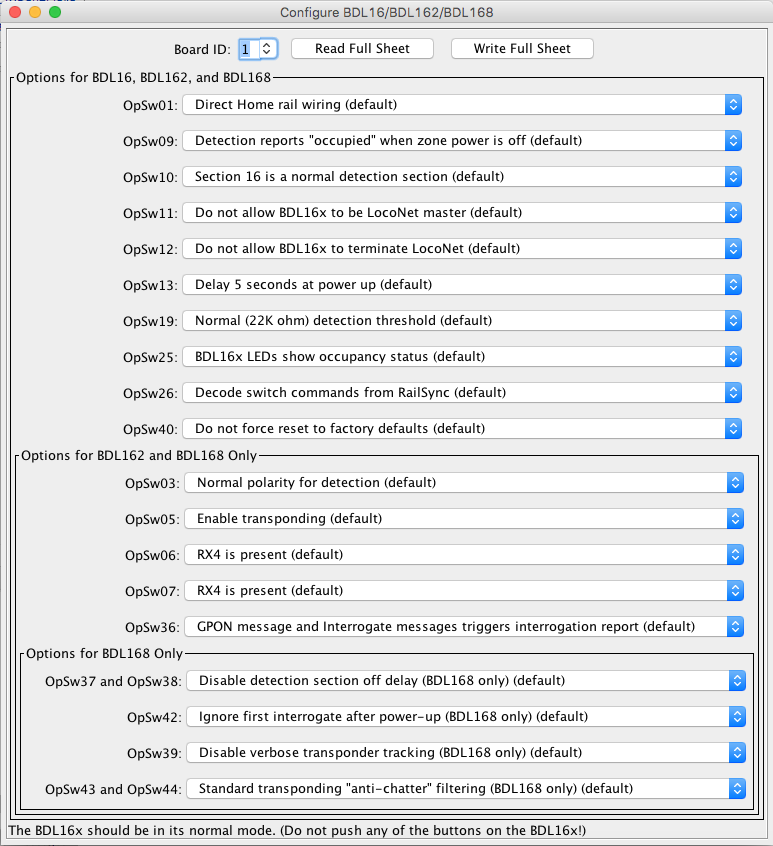
The JMRI BDL16x programming tool lets you configure the internal options of a BDL16, BDL162, or BDL168 directly from your computer, when the board is connected to a JMRI LocoNet connection.
To open this tool select "Configure BDL16/BDL162/BDL168" from the LocoNet menu.
Each BDL16x device present on the LocoNet connection is identified by its "Board ID". This tool may access a particular BDL16x device by entering the "Board ID" number in the selection box at the upper left of the tool window.
Upon start-up, this tool queries the LocoNet connection to create a list of BDL16x devices. Each BDL16x Board ID is added to the list in the pull-down selector, accessed by selecting the downward-pointing triangle which is just to the right of the Board ID text entry space.
Any time that a Board ID number is typed into the Board ID text entry space, the number will be added to the list if it is not already present in the list.
While it is possible to change the Board ID number using JMRI, it cannot be done using this tool due to limitations of the BDL16x design. Instead, follow the instructions found here. Those instructions are for programming a BDL168 board, but they are believed to apply also to BDL16 and BDL162 boards.
This tool only accesses the board's OpSw values when the "Read Full Sheet" or "Write Full Sheet" button is pressed.
The "Read Full Sheet" button may be used to read the OpSw settings from the BDL16x. Performing the "Read Full Sheet" operation reads all OpSw values from the board selected by the "Board ID" field and updates each of the tool's selections.
The "Write Full Sheet" button may be used to write the OpSw settings currently shown in the tool to the BDL16x device specified by the "Board ID" number shown at the top of the window. Performing the "Write Full Sheet" operation writes all OpSw values to the board.
The basic operating settings are shown grouped into three sections:
Each setting may be changed by selecting one of the options from the pull-down list of values.
When performing a "Write Full Sheet" operation to a BDL16 or BDL162 device, this tool will write all of the OpSw values, not just the OpSw values which are defined for the BDL16 or BDL162 device. This is thought to be safe, as it is thought that these OpSw values will be ignored by the hardware. If you are concerned that this may not be acceptable, then select the "default" value for the OpSw values which do not apply to the board type which you are configuring.
Documentation for the BDL16, BDL162, and BDL168 can be found at the Digitrax Web Site.