
To create a Memory Variable, click the "Add..." button on the Memory Variable Table. This will open a new pane with space to enter a System Name and User Name for the new Memory Variable, and a "Create" button at the bottom.
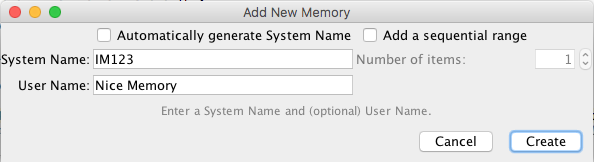
You must enter a unique System Name. System Names for Memory Variables have no set pattern. You can call them whatever you want. There's a weak convention of starting them with "IM" for "Internal Memory", but that's not required.
The User Name is optional, unless you check "Automatically generate System Name", and if you enter one it has to be unique in your JMRI setup. See the "Names" Help page for more information.
It is also possible to create a number of Memories in one go.
Checking the "Add a sequential range" box will enable the "Number of items" field. Set the
number of Memories that you wish to add. Clicking [Create] will create a number of
sequentially numbered Memories.
If a User Name has been entered, a number will be added to the end of that name (starting
with the second item) to keep each Memory User Name unique.
Back to the Memory Variable Table help page.