
Please note that the Throttles Help was updated. Current version:
Chances are, if you are reading this text, then you probably saw reference to the "throttles" in the JMRI user group postings. And the first question that probably came to your mind was, "where the heck do I find these throttles?"
Well you've started at the right place. The first thing this section is going to do is show you how to gain access to the throttles. This section will also touch on the menu options that are available.
First, it is important to understand that the JMRI Project is a group of many "tools" for your railroad - with many contributions from different programmers. There are four primary startup applications available
For the purposes of this user guide, the JMRI Demo startup application was used for the purposes of writing these pages. However, you will find that many of the tools "cross over" to multiple startup applications. The Throttle Tool is a good example of this. No matter which of the above mentioned applications you start with, you will be able to find the throttles.
In each of the startup applications noted above, there is always a "primary" main window displayed on your screen (similar to that shown below in figure 1-1). Close down this window and the whole application will terminate. This main window contains a primary set of menu options. This is where you will find most of the tools and options available - including the Throttles.
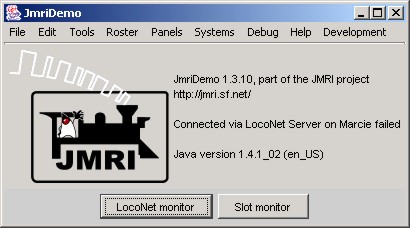
Figure 1-1: JMRI main menu structure
The Throttles submenu (as shown in figure 1-2 below) contains the following menu options, which are defined as:
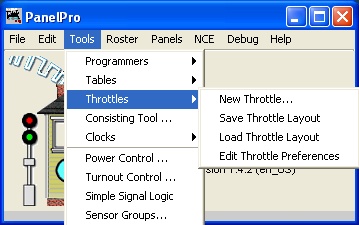
Figure 1-2: JMRI Throttles submenu structure
Use the links below to advance to the next chapter to walk through the process of opening up a new Throttle window and setting up some of the available options, and lets not forget... run a Locomotive.

|

|
TOC |
|

|